Find's Treasure Forums

Welcome to Find's Treasure Forums, Guests!

You are viewing this forums as a guest which limits you to read only status.

Only registered members may post stories, questions, classifieds, reply to other posts, contact other members using built in messaging and use many other features found on these forums.

Why not register and join us today? It's free! (We don't share your email addresses with anyone.) We keep email addresses of our users to protect them and others from bad people posting things they shouldn't.

Click here to register!


Need Support Help?

Cannot log in?, click here to have new password emailed to you

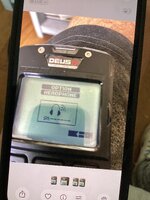
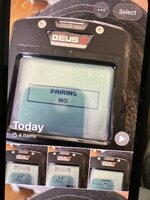
backphones wont pair

targets

Active member
it keeps coming up with a message, versions are the same ,but no dice
dealer dont know why
 

Attachments

  • IMG_2490.jpeg
    IMG_2490.jpeg
    1.3 MB · Views: 7
  • IMG_2488.jpeg
    IMG_2488.jpeg
    1.2 MB · Views: 6
Could your entered S/N be in error? Sometimes the characters can be misread due to wear, such as 6 as a G, or 8 as a 6, etc.
A number of people have had that problem pairing their coils.

If you're sure about the S/N, then my personal next step would be to remove the backphone battery for 5 min to let the stored conditions reset to default.
That won't mess with any settings, but the programming can get corrupted and maintain an unwanted state as long as power is supplied.
To remove the power, you would need to remove the cover on the backphones. Then using small needle nose pliers or hemostat, unplug the connector for 5 min.
Reconnect the small plug, replace the cover, and test.
 
Could your entered S/N be in error? Sometimes the characters can be misread due to wear, such as 6 as a G, or 8 as a 6, etc.
A number of people have had that problem pairing their coils.

If you're sure about the S/N, then my personal next step would be to remove the backphone battery for 5 min to let the stored conditions reset to default.
That won't mess with any settings, but the programming can get corrupted and maintain an unwanted state as long as power is supplied.
To remove the power, you would need to remove the cover on the backphones. Then using small needle nose pliers or hemostat, unplug the connector for 5 min.
Reconnect the small plug, replace the cover, and test.

There is no serial number needed pairing headphones. Only the coil.
Granted when pairing headphones, headphones serial number will come in the detector screen for short period.
 
Last edited:
Top